
Jira
A Better Jira Workflow for Visual Website Feedback
See how teams can use WebAnnotates and Jira together to turn element-level website feedback into structured, prioritised tickets without losing page context.
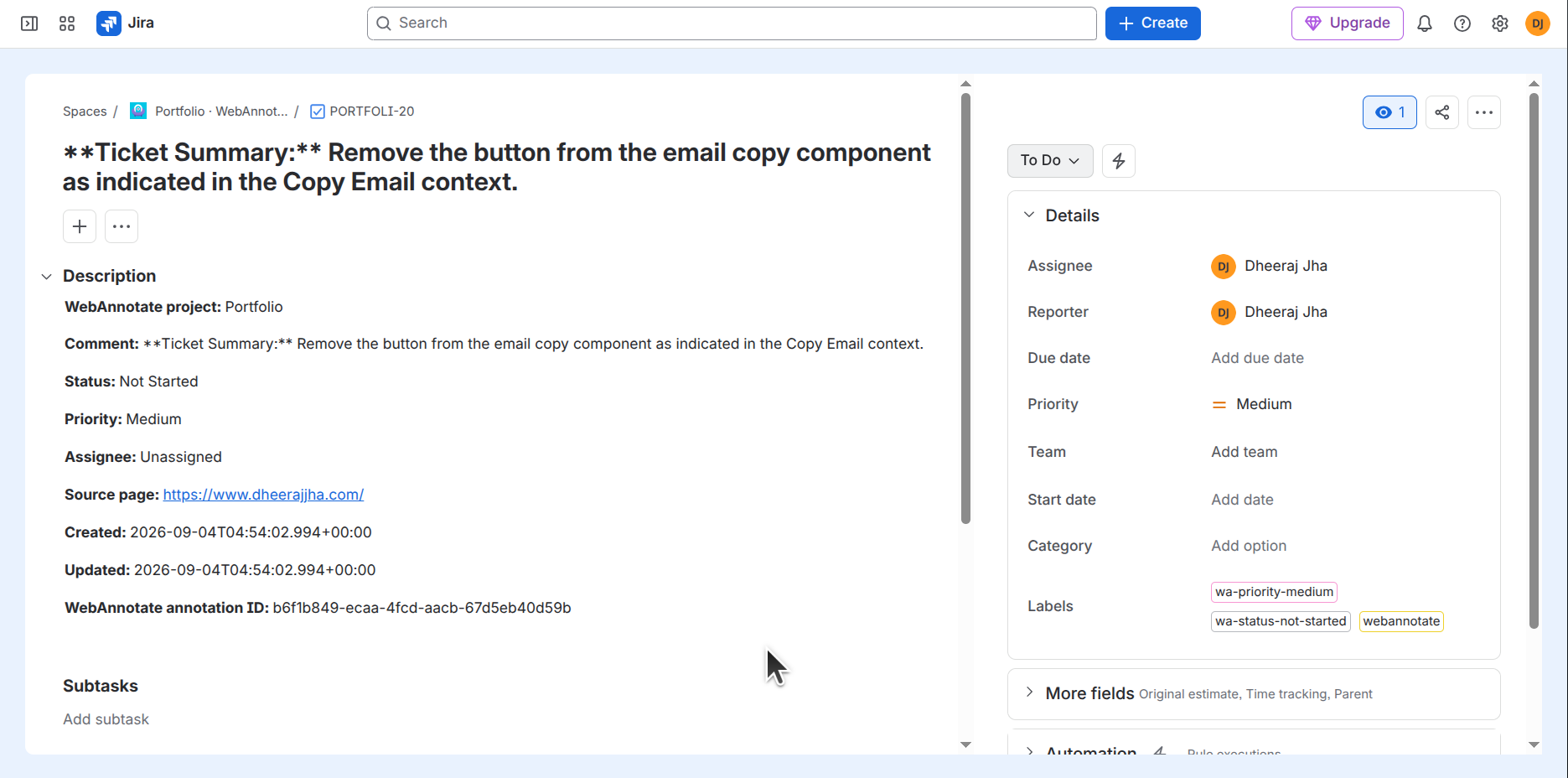
Jira is strong at planning, prioritisation, and accountability. It is less suited to collecting visual feedback from a live website on its own. Combining Jira with WebAnnotates gives each tool a focused role: capture the evidence where it happens, then manage the work where the team already operates.
Why screenshots and ticket titles are rarely enough
A screenshot is a useful attachment, but it cannot always show the page state, the selected element, the surrounding interactions, or the intent of the reviewer. A title such as “Homepage CTA” may be clear to the author on Monday and ambiguous to the implementation owner on Thursday.
Visual feedback should arrive in Jira with a readable description, relevant context, and a link back to the source of the request. That keeps Jira tickets concise without stripping out the evidence.
Create a handoff that survives triage
The path from WebAnnotates to Jira should preserve the original annotation, an improved brief when needed, and enough information for the team to classify the work. Product managers can then set priority and scope while engineers can assess the implementation without reopening a chain of clarification messages.
A ticket is most useful when it is ready for a decision. It does not need to contain every conversation that led to it, but it should retain the page-level context needed to revisit the request.
Keep Jira as the operational source of truth
Use Jira for ownership, workflow status, sprint planning, and delivery reporting. Use WebAnnotates for the point of capture and the visual record. This prevents duplicate project-management systems while reducing the amount of manual copying between browser review, messages, and backlog.
If a ticket is assigned to an AI provider, the same principle applies: the provider should receive the structured request, while Jira continues to show the work’s project status.
A practical Jira triage checklist
Before moving a visual feedback ticket into implementation, confirm the request is ready to be acted on. A short checklist protects both the reviewer and the person doing the work.
- The target page and element are clear
- The observed issue and desired outcome are distinct
- Priority and owner are set in Jira
- Any responsive, accessibility, or brand constraints are recorded
- The final reviewer is known before work begins
Put the workflow into practice
Keep website feedback connected to the work it creates.
Capture context on the live page, create a clear brief, sync the task, assign the right provider, and keep a human in the review loop.
Start with WebAnnotatesQuestions
Frequently asked questions
Can WebAnnotates work alongside an existing Jira project?
Yes. The goal is to send structured visual feedback to the Jira workflow your team already maintains.
Who should prioritise visual-feedback tickets?
The same product, delivery, or engineering owners who prioritise your other Jira work. WebAnnotates improves the input; it does not replace team decisions.